

Adding funds with a credit card

You can add credit to your account with a Visa, Mastercard or other card, and use it later to pay your invoices.

Steps

  1. In the side menu, choose Billing → Add Funds.
  2. Enter the amount you want to add, in US dollars.
  3. Under Payment Method, choose Credit Card.
  4. Click Add Funds, then complete the payment by entering your card details on the secure gateway page.
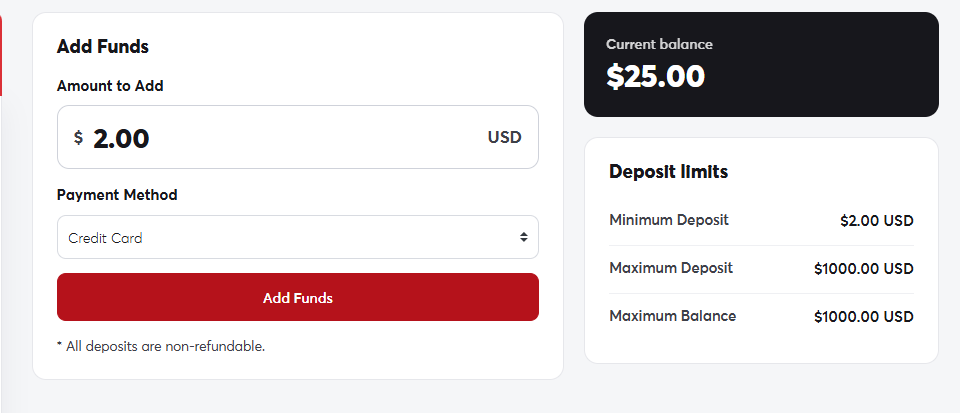
The Add Funds pageThe Add Funds page

The amount is added to your balance as soon as the payment succeeds, and shows on your account card.

Deposit limits

  • Minimum deposit: $2.
  • Maximum per deposit: $1,000.
We don't store your card details on our servers. Payments are processed entirely by a secure international payment gateway. If your card is in a currency other than US dollars, your bank converts the amount automatically.
If your card is declined, check with your bank that online and international payments are enabled, or try paying with PayPal.

Was this answer helpful?

Related Articles

Your client area dashboard The client area dashboard is the first page you see after logging in. From it you can reach all your services, domains, invoices and... Updating your account details Your account details appear on your invoices and are used by default for new domain registrations, so keep them accurate and up to date.... Changing your password We recommend changing your password regularly, and straight away if you think someone else knows it. Steps Click your name in the side... Account security: Google sign-in and security question On the Security Settings page you can link your account to Google to log in with one click, and set a security question that we use to... Users and contacts If an employee or developer helps you manage your site, don't share your password with them. Add them as a user with specific...