Logging in to cPanel

cPanel is where you manage your website: files, email, databases, backups, SSL certificates and more.

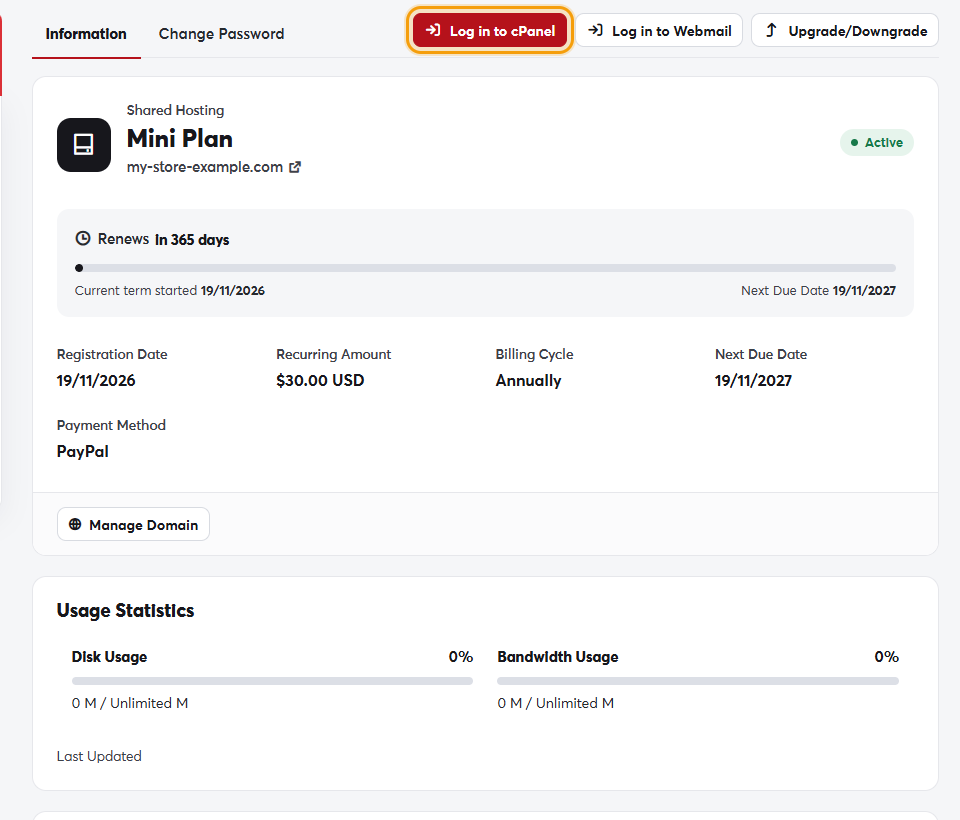
The easy way: from your SAJJEL.NET account

  1. In Services → My Services, click your hosting service.
  2. Click Log in to cPanel.
The Log in to cPanel button on the service pageThe Log in to cPanel button on the service page

cPanel opens directly, without typing a username or password.

Logging in directly

You can also open https://yourdomain.com:2083 in your browser (replace yourdomain.com with your domain) and use the username and password from your welcome email.

If you've forgotten your cPanel password, log in from your SAJJEL.NET account as above, or change it on the service page's Change Password tab.
The most-used cPanel tools are also available as direct links in the service page's Quick Shortcuts section.

Was this answer helpful?

Related Articles

How to order a hosting plan Hosting is the space on a server where your website's files, databases and email are stored. We offer shared hosting, reseller... Managing your hosting services From your client area you can follow all your hosting services: their status, renewal date and usage, and quick access to their tools.... Creating an email account on your domain Every hosting plan lets you create professional email addresses on your domain, such as [email protected] or [email protected]. The... Uploading your website files For your website to appear online, its files must be inside the public_html folder of your hosting account. There are two ways to upload... Upgrading or downgrading your plan When your site grows or your needs change, you can move to another plan without moving your files and without downtime. Upgrade steps In...