Requesting a cancellation

If you no longer need one of your services, you can request its cancellation from your client area.

How to request a cancellation

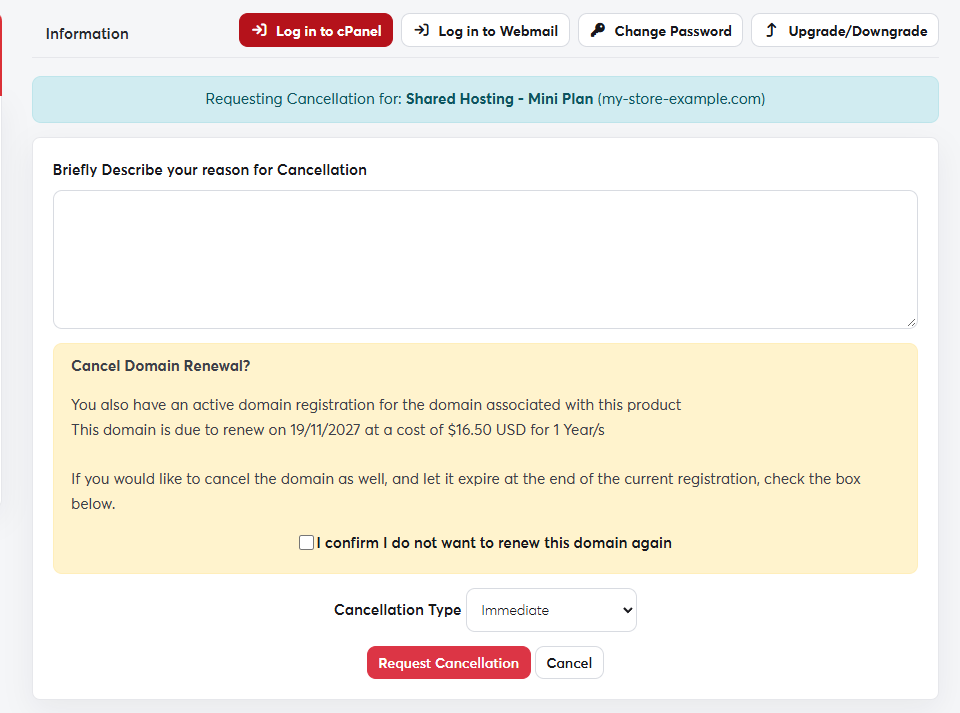
  1. In Services → My Services, click the service.
  2. From the actions menu, choose Request Cancellation.
  3. Briefly describe your reason. It helps us improve our services.
  4. Choose the Cancellation Type:
    • Immediate: the service is cancelled as soon as possible and its data is deleted.
    • End of Billing Period: the service keeps working until the paid period ends, then it is cancelled.
  5. Click Request Cancellation.
The cancellation request pageThe cancellation request page
Cancellation permanently deletes the website files, databases and email accounts. Take a full backup from Backup in cPanel before you request it.
Cancelling hosting doesn't cancel the domain linked to it. To stop the domain renewing, turn off auto-renew or tick the domain option on the cancellation page.

Was this answer helpful?

Related Articles

How to order a hosting plan Hosting is the space on a server where your website's files, databases and email are stored. We offer shared hosting, reseller... Managing your hosting services From your client area you can follow all your hosting services: their status, renewal date and usage, and quick access to their tools.... Logging in to cPanel cPanel is where you manage your website: files, email, databases, backups, SSL certificates and more. The easy way: from your SAJJEL.NET... Creating an email account on your domain Every hosting plan lets you create professional email addresses on your domain, such as [email protected] or [email protected]. The... Uploading your website files For your website to appear online, its files must be inside the public_html folder of your hosting account. There are two ways to upload...