

All your domains are in one place in your client area. From there you control renewals, nameservers, the registrar lock, contact details and more.
Find your domains
- Log in to your account.
- In the side menu, choose Domains → My Domains.
- You will see your domains with each one's status and expiry date. Click a domain to open its management page.
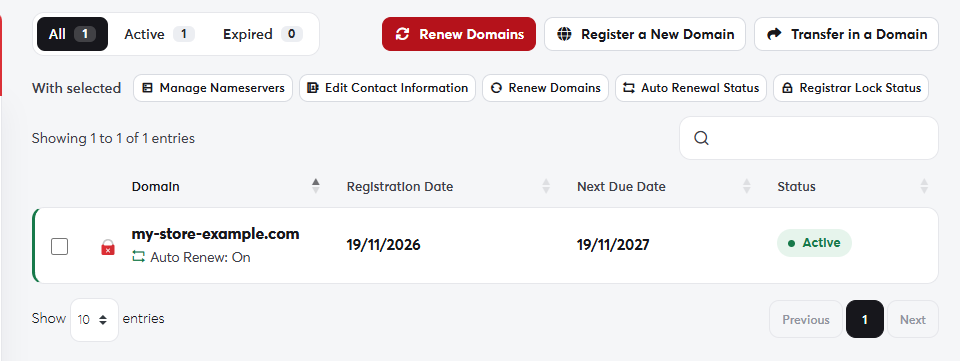 My Domains
The domain management page
The domain page shows the registration date, next due date, renewal price and auto-renew status. Tabs along the top give you every setting:
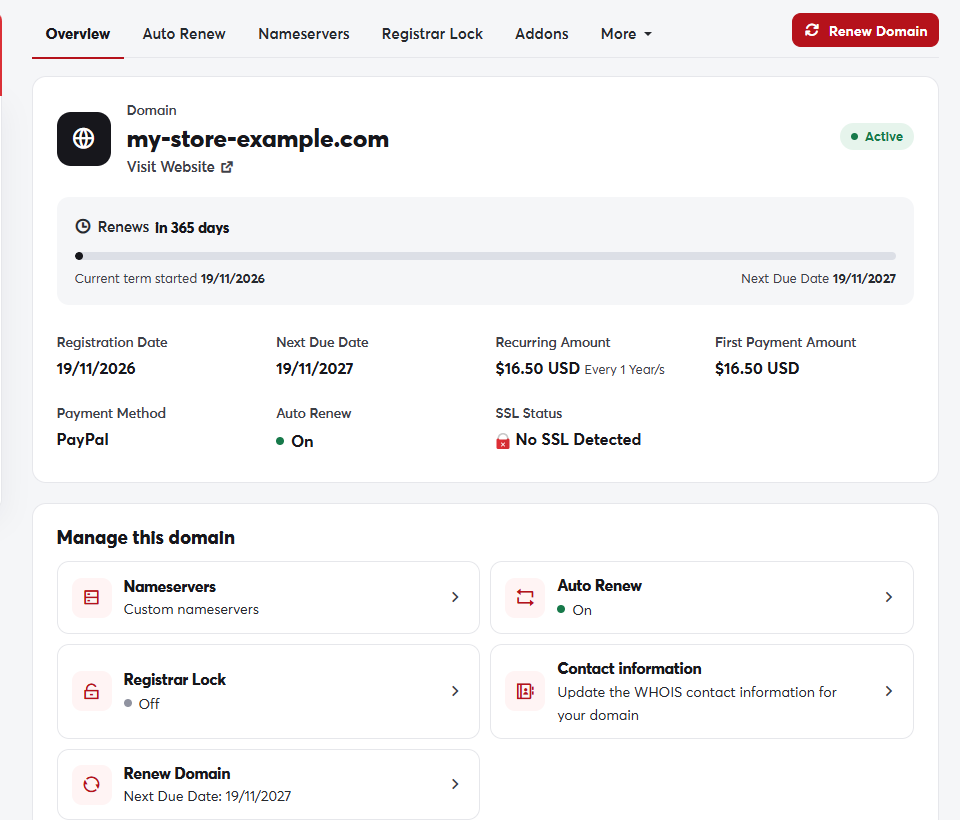 The domain management page
- Overview: a summary of the domain and quick renewal buttons.
- Auto Renew: turn automatic renewal on or off. See Domain auto-renew.
- Nameservers: choose where the domain points. See Nameservers.
- Registrar Lock: protect the domain from unauthorised transfers. See Registrar lock.
- Addons: DNS management, email forwarding and ID protection.
- More: contact information, EPP code and private nameservers.
Keep an eye on the expiry date. An expired domain takes your website and email offline. Turn on auto-renew and make sure you have credit or a valid payment method on file.
